12-子弹派生类
这节课,我们要实现子弹的派生类
1 PeaBullet类
首先实现PeaBullet类的基本定义
class PeaBullet : public::Bullet
{
public:
    PeaBullet() = default;
    ~PeaBullet() = default;

private:
    Animation animation_break;      //豌豆子弹破碎动画
};
我们准备了三种不同的豌豆破碎的声音,用于在豌豆子弹发生碰撞时随机播放。这种设计非常常见,比如脚步声、枪声等。
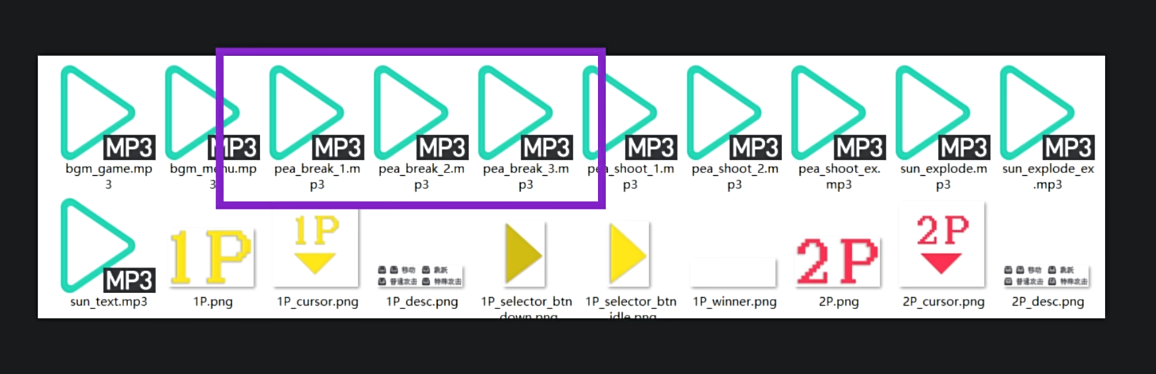
因此,我们就需要重写on_collide()等函数的逻辑了
void on_colilde()
{
    Bullet::on_collide();

    switch (rand() % 3)
    {
    case 0:
        mciSendString(_T("play pea_break_1 from 0"), NULL, 0, NULL);
        break;
    case 1:
        mciSendString(_T("play pea_break_2 from 0"), NULL, 0, NULL);
        break;
    case 2:
        mciSendString(_T("play pea_break_3 from 0"), NULL, 0, NULL);
        break;
    }
}

void on_update(int delta)
{
    position += velocity * (float)delta;

    if(!valid)
    {
        animation_break.on_update(delta);
    }

    if (check_if_exceeds_screen()) {
        can_remove = true;
    }
}

void on_draw(const Camera& camera) const
{
    if(valid) {
        putimage_alpha(camera, (int)position.x, (int)position.y, &img_pea);
    } else {
        animation_break.on_draw(camera, (int)position.x, (int)position.y);
    }
}
我们还需要引入外部变量,和编写构造函数
extern IMAGE img_pea;                   // 豌豆图片
extern Atlas atlas_pea_break;           // 豌豆破碎动画图集
PeaBullet() {
    size.x = 64, size.y = 64;

    damage = 10;

    animation_break.set_atlas(&atlas_pea_break);
    animation_break.set_interval(100);
    animation_break.set_loop(false);
    animation_break.set_callback([&]() { can_remove = false; });
}
2 SunBullet类
class SunBullet : public::Bullet
{
public:
    SunBullet() = default;
    ~SunBullet() = default;

private:
    Animation animation_idle;       //日光炸弹默认动画
    Animation animation_explode;    //日光炸弹爆炸动画
    Vector2 explode_render_offset;  //爆炸动画渲染偏移
};
与豌豆子弹不同的是,日光炸弹在默认状态下就有不断闪烁的动画效果。所以,我们需要两个动画对象。
除此之外,我们还需要一个二维向量来描述爆炸动画渲染时的位置偏移。
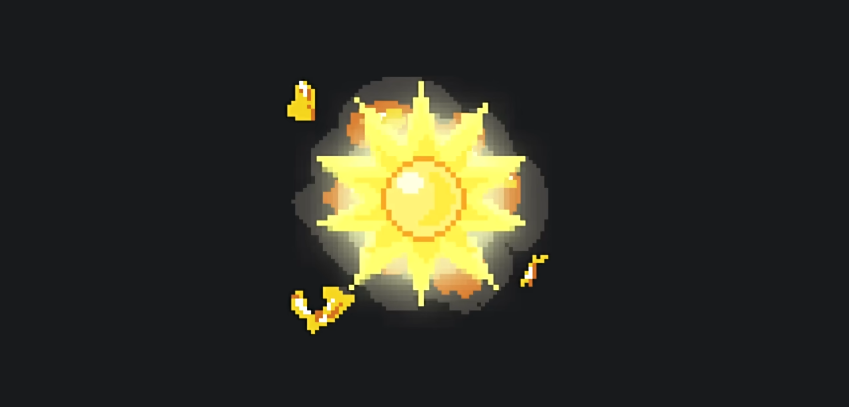
这时因为爆炸和默认状态时图片的尺寸不同,所以我们需要这个偏移量来让它们在渲染时中心是对齐的。
SunBullet() {
    size.x = 96, size.y = 96;
    damage = 20;

    animation_idle.set_atlas(&atlas_sun);
    animation_explode.set_atlas(&atlas_sun_explode);
    animation_idle.set_interval(50);
    animation_explode.set_interval(50);
    animation_explode.set_loop(false);

    IMAGE *frame_idle = animation_idle.get_frame();
    IMAGE *frame_explode = animation_explode.get_frame();

    explode_render_offset.x = (frame_idle->getwidth() - frame_explode->getwidth() ) / 2;
    explode_render_offset.y = (frame_idle->getheight() - frame_explode->getwidth()) / 2;
}
当发生碰撞时,摄像机会发生抖动,并且要播放爆炸音效。
void on_collide()
{
    Bullet::on_collide();

    main_camera.shake(5, 250);

    mciSendString(_T("paly sun_explode from 0"), NULL, 0, NULL);
}
随后便是实现on_updata更新方法了
我们先回顾一下PeaBullet类的更新方法
void on_update(int delta)
{
    position += velocity * (float)delta;

    if(!valid) {
        animation_break.on_update(delta);
    }

    if(check_if_exceeds_screen()) {
        can_remove = true;
    }
}
注意,在这里无论豌豆是否已经发生了碰撞,都会一直向前飞行,配合爆炸动画,形成飞溅效果。
但是日光炸弹不能够如此简单粗暴地实现更新,炸弹的爆炸动画应该留在原地,而不会继续受到重力影响运动。我们先声明重力常量
private:
    const float gravity = 1e-3f;    //日光炸弹重力
然后实现on_update以及on_draw方法
void on_update(int delta)
{
    if (valid)
    {
        velocity.y += gravity * delta;
        position += velocity * (float)delta;
    }

    if(!valid) {
        animation_explode.on_update(delta);
    } else {
        animation_idle.on_update(delta);
    }

    if(check_if_exceeds_screen())
    {
        can_remove = true;
    }
}

void on_draw(const Camera& camera) const
{
    if(valid) {
        animation_idle.on_draw(camera, (int)position.x, (int)position.y);
    } else {
        animation_explode.on_draw(camera,
            (int)(position.x+explode_render_offset.x),
            (int)(position.y+explode_render_offset.y));
    }
}
3 SunBulletEx类
class SunBulletEx: public Bullet
{
public:
    SunBulletEx() = default;
    ~SunBulletEx() = default;
private:
    Animation animation_idle;       // 巨大日光炸弹默认动画
    Animation animation_explode;    // 巨大日光炸弹爆炸动画
    Vector2 explode_render_offset;  // 爆炸动画渲染偏移
};
之后重写构造函数,在其中对于私有变量进行初始化。
SunBulletEx()
{
    size.x = 288, size.y = 288;

    damage = 20;

    animation_idle.set_atlas(&atlas_sun_ex);
    animation_idle.set_interval(50);

    animation_explode.set_atlas(&atlas_sun_ex_explode);
    animation_explode.set_interval(50);
    animation_explode.set_loop(false);
    animation_explode.set_callback([&](){ can_remove = true; });

    IMAGE *frame_idle = animation_idle.get_frame();
    IMAGE *frame_explode = animation_idle.get_frame();
    explode_render_offset.x = (frame_explode->getwidth() - frame_idle->getwidth()) / 2;
    explode_render_offset.y = (frame_explode->getheight() - frame_idle->getheight()) / 2;
}
之后我们实现on_collide方法,进行更大范围的摄像机抖动,并且播放与之对应的音效
void on_collide()
{
    Bullet::on_collide();

    main_camera.shake(20, 350);

    mciSendString(_T("play sun_explode_ex from 0"), NULL, 0, NULL);
}
由于大型日光炸弹的尺寸更大,所以原有的碰撞检测算法已经不太合适了,我们应该重写check_collision方法.
这里的检测方法就是之前检测两个矩形是否重合的方法
bool check_collision(const Vector2& position, const Vector2& size)
{
    bool is_collide_x = (std::max(this->position.x + this->size.x, position.x + size.x)
        - std::min(this->position.x, position.x) ) <= (this->size.x + size.x);
    bool is_collide_y = (std::max(this->position.y + this->size.y, position.y + size.y)
        - std::min(this->position.y, position.y) ) <= (this->size.y + size.y);

    return is_collide_x && is_collide_y;
}
接下来on_update和on_draw方法的实现和小型日光炸弹相似
void on_update(int delta)
{
    if(valid) {
        position += velocity * (float)delta;
    }

    if(!valid) {
        animation_explode.on_update(delta);
    } else {
        animation_idle.on_update(delta);
    }

    if(check_if_exceeds_screen()) {
        can_remove = true;
    }
}

void on_draw(const Camera& camera) const
{
    if(valid) {
        animation_idle.on_draw(camera, (int)position.x, (int)position.y);
    } else {
        animation_explode.on_draw(camera,
            (int)(position.x + explode_render_offset.x),
            (int)(position.y - explode_render_offset.y));
    }
}
评论
如果你已登录 GitHub,就可以直接在这里评论。